
Your infrastructure engineer
Asama is an AI infrastructure engineer for teams who run their own metal. It detects faults across hardware, firmware, OS and virtualization, investigates them to root cause, and executes the fix you approve.
Detection
Thresholds only catch what someone thought to set a number for. And the failures that matter cross layers: the symptom surfaces in virtualization, the cause sits in firmware, and the two are owned by different people with different tools.
reallocated sectors · pending sectors · media & data integrity errors
lab-sf-118
CriticalToday · 13:08
SMART reports pre-failure on /dev/sdc (Seagate ST16000NM001G): Reallocated_Sector_Ct 248, above the vendor threshold of 36.
lab-sf-007
Warning15 days ago · 10:58
SMART media and data integrity errors on /dev/nvme1n1 rose to 19. No read failures yet.
Hardware Fault
Hardware rarely fails without warning. It degrades, and the warning sits in counters nobody reads until after the outage. Asama watches them on every host, and compares every host against its peers.
On lab-sf-156, the PxeDev3EnDis setting is Disabled, whereas the expected value is Enabled.
Impact
These BIOS/UEFI PXE network adapter settings can cause network boot availability and VLAN selection to differ from the peer cluster, potentially preventing access to the intended provisioning network.
Related anomalies
- · PxeDev1EnDis has Enabled state instead of Disabled.
- · PxeDev3VlanEnDis has Enabled state instead of Disabled.
Config Drift
Fleets diverge quietly. A chassis returns from RMA with vendor defaults. A setting changed during an incident is never reverted. Nothing looks wrong on the machine itself, only next to its peers.
On lab-sf-019, CPU context switches are 70,233.39 switches/s, whereas the expected rate is 50,855.36 switches/s.
Impact
Excessive CPU context switching can consume processor time and reduce application performance, particularly under load.
Performance Anomaly
The hardest fault to catch is the one where nothing is broken and nothing is misconfigured. The machine simply is not behaving like itself, and no number is out of range.
Security update for Dell PowerEdge Server BIOS: improper privilege management
Advisory ID: DSA-2024-035
Vulnerability summary
A vulnerability in Dell PowerEdge Server BIOS allows a local attacker to escalate privileges on affected systems, compromising system integrity.
Incident times
From Sep 13 · 20:31 · To Now
Firmware and OS Vulnerability
Advisories tell you a version is affected. They do not tell you which of your machines are running it, which are exposed, or which you can safely take down to patch.
Asama watches hardware, BMC, firmware, kernel and virtualization as one system, learning what normal looks like for every host and for its peer group. Four kinds of deviation surface: a component degrading, a configuration that has diverged, behaviour off baseline, and a published vulnerability running in your fleet.
Investigate incidents
Transient issues are difficult to debug. A server drops a burst of inbound packets, recovers on its own, and by the time anyone logs in the evidence is gone. What remains on that host all correlates: the drops, the kernel pressure, the socket errors. None of it causes, and not one of them names a sender.
Summary
reporting-vm's NFS-backed disk is served from /dev/md0 on lab-sf-31, where the RAID1 array is degraded and an active discard job is issuing operations against the same device. Host load on lab-sf-30 peaked earlier and has since fallen, so the slowdown may be intermittent.
Issue at a glance
Evidence
-
lab-sf-31 has RAID1 array
View mdstat/dev/md0in state[4/3] [UUU_], confirming it is running without redundancy. -
The active workload on lab-sf-31 is
View processesdemo-fstrim, running against/dev/md0for7:28with2.7%CPU. -
The VM process on lab-sf-30 uses the NFS-backed disk and is currently at
View VM process12.1%CPU.
Asama keeps the state across every layer, so the window can be reopened. It tests each candidate against the dependency graph and the timeline, and discards what the evidence rules out. Three hosts were sending at once, each unremarkable alone. The cause was never on the server reporting the problem.
Remediation workflow
The hard parts are the ones around the fix: staying inside the maintenance policy, coordinating with the teams whose workloads sit on those hosts, and knowing what to do at 2am when step four does something nobody planned for.
5 steps · 2 phases (Prepare, Execute)
Prepare
/etc/systemd/journald.conf: Execute
/etc/systemd/journald.conf - · Show live journald settings for changed keys.
- · Send remediation completed alert.
- · Restore original /etc/systemd/journald.conf from staging backup.
- · Send remediation failed alert.
Remediation impact
Journald's persistent log storage on db4 is bounded to prevent disk pressure, restoring headroom without losing recent log history.
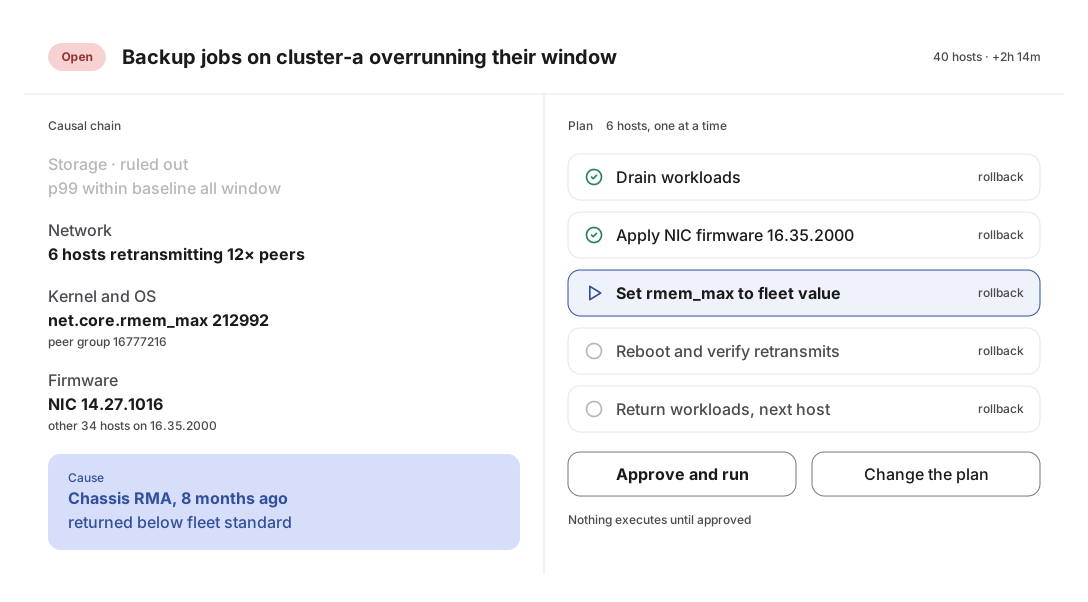
Asama plans the fix against your maintenance policy and sends it for approval. Change what you want, and every edit becomes an input to the next plan, so plans converge on how your team actually works. Once approved, the Workflow Orchestration Coordinator executes the plan across every step and host, verifying as it goes and looping a human in when verification fails.
Start here
Your infrastructure already has the data. Give it an engineer.
See how Asama investigates, explains and remediates a real infrastructure problem.
Bring one recurring problem your current tooling has not solved. We will show you how Asama detects it, concludes, and acts.